


Imagine waking up to an AI that doesn’t just answer questions—it quietly handles your inbox, schedules your meetings, and keeps your day on track. That’s Clawdbot AI: an open-source, self-hosted personal assistant built to tackle real-world tasks on its own.
As one of the most practical examples of autonomous AI agents I’ve come across, it moves far beyond the usual chatbot replies. It actually does the work.
For business owners and teams in Dubai and the UAE looking at AI automation services, Clawdbot opens up a smart, low-cost path to real efficiency gains. The catch? Getting it running securely and at enterprise scale almost always needs the steady hand of experienced AI consulting in Dubai. Otherwise, what starts as a promising experiment can quickly become a headache.
That’s exactly where thoughtful implementation makes all the difference.
What Is Clawdbot AI?
Clawdbot AI represents a new generation of AI tools focused on practical autonomy. At its core, it is a locally run software framework that allows users to interact with an AI agent through familiar messaging apps. Unlike traditional AI models that merely generate text, Clawdbot AI can access systems, manipulate files, and carry out instructions in a persistent, context-aware manner.
What sets Clawdbot AI apart from standard chatbots is its ability to act independently. Chatbots typically respond to queries within a contained session, often forgetting previous interactions. In contrast, Clawdbot AI maintains long-term memory, enabling it to build on past tasks and preferences. This makes it more like a digital collaborator than a reactive tool.
For enterprises and AI-driven businesses, Clawdbot AI matters because it aligns with the shift toward enterprise AI solutions. In regions like Dubai, where digital transformation is accelerating, tools like this can streamline operations. However, its open-source nature means it requires careful customization to fit complex business needs, highlighting the value of partnering with an AI development company Dubai for tailored implementations.
Businesses exploring custom AI development UAE can view Clawdbot AI as a foundation for building AI agents for business, but it demands expertise to integrate securely without compromising data integrity.
Why Is Clawdbot AI Trending?
Clawdbot AI gained rapid popularity in early 2026, amassing over 100,000 GitHub stars shortly after its launch. This viral growth stems from its practical demonstrations—users shared videos of the agent autonomously handling emails, scheduling meetings, and even controlling smart devices. The tool’s mascot, a “space lobster,” added a memorable, shareable element that fueled social media buzz on platforms like X and Reddit.
Developer interest surged due to its open-source code, allowing tinkerers to extend functionalities quickly. Enterprises took notice because Clawdbot AI exemplifies autonomous AI agents that promise to reduce manual workloads. In a market hungry for AI automation services, its ability to “do things” rather than just advise resonated strongly.
For AI consulting companies, this trend signals opportunities and challenges. It means more demand for expert guidance in deploying such tools safely. In Dubai’s competitive tech landscape, where businesses seek edge through innovation, Clawdbot AI’s rise underscores the need for AI consulting Dubai to bridge the gap between hype and reliable enterprise AI solutions.
Overall, the trend points to a broader movement: businesses want AI that integrates seamlessly into workflows, but achieving that requires professional oversight to mitigate risks.
How Does Clawdbot AI Work?
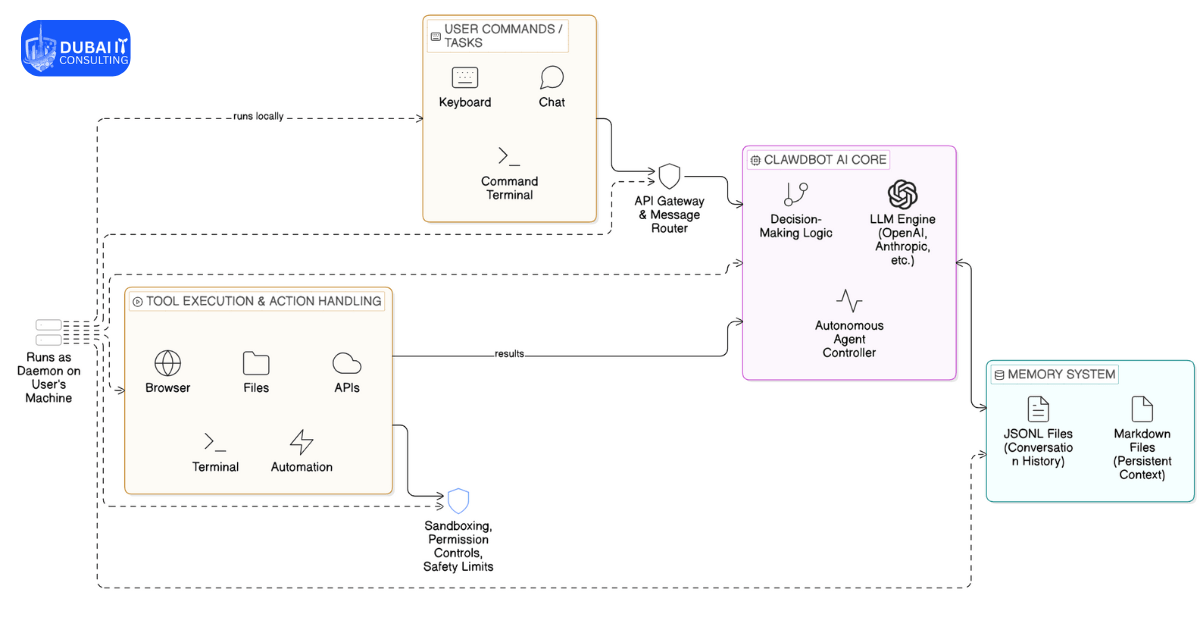
Clawdbot AI, rebranded as OpenClaw or Moltbot in some contexts, operates on a layered, gateway-centric architecture that emphasizes modularity, local execution, and user control. This design enables it to function as an autonomous agent, bridging natural language inputs from messaging platforms with real-world actions on the user’s device. Below, we break it down step by step, drawing from its open-source structure to provide a clear, comprehensive view.
Overall Operational Flow
Clawdbot starts by receiving inputs through integrated chat platforms, processes them via its core components, and executes tasks while maintaining persistent context. Unlike cloud-based assistants, it runs entirely locally, prioritizing privacy and customization. The system is built around a “gateway-brain-skill” pattern, where the gateway manages communications, the brain (LLM) handles reasoning, and skills enable specific actions.
Layer 1: Channel Adapters – Handling User Inputs
The entry point for interactions is through channel adapters, which connect Clawdbot to over a dozen messaging platforms, including Telegram, WhatsApp, Discord, Slack, Signal, and Microsoft Teams. These adapters normalize incoming messages—converting varied formats (text, attachments, or voice notes) into a unified structure that the system can process consistently.
For example, a user might send a command via Telegram: “Check my emails and summarize key points.” The adapter extracts the message, identifies the session (e.g., direct message or group chat), and forwards it to the next layer. This ensures seamless integration into daily workflows, making it feel like a natural extension of existing tools rather than a standalone app.
Layer 2: Gateway Server – The Control Plane
At the core is the gateway server, which runs as a daemon (a persistent background process) on the user’s machine, typically listening on port 18789 via WebSocket. This layer acts as the central hub for routing and coordination:
- Session Router: Assigns incoming messages to specific sessions, preventing confusion in multi-user or multi-platform scenarios.
- Lane Queue: Manages task concurrency by queuing actions serially, avoiding race conditions where multiple commands might interfere (e.g., two file edits at once).
- WebSocket Interface: Exposes controls for additional interfaces like CLI tools, web UIs, or custom apps, allowing advanced users to monitor or extend functionality.
The gateway ensures deterministic routing—responses always return to the originating channel—while maintaining isolation between sessions to protect data integrity.
Layer 3: Agent Runner – Preparing for Intelligent Processing
Once routed, the agent runner prepares the input for the LLM:
- Model Resolver: Selects the appropriate LLM based on configuration (e.g., Claude Opus for complex reasoning or GPT for efficiency). Users provide their own API keys, supporting models from Anthropic, OpenAI, or even local options like Ollama.
- System Prompt Builder: Dynamically assembles prompts by incorporating enabled skills, user preferences, and context. This keeps prompts concise to fit within token limits.
- Session History Loader: Pulls relevant history from storage, using a context window guard to compress or truncate if needed, preventing overload.
- Memory Integration: Here, the dual memory system shines:
- JSONL Files: Store full conversation transcripts for chronological recall.
- Markdown Files: Hold persistent, editable context like “MEMORY.md” for long-term details (e.g., project notes or user habits).
- Search uses a hybrid approach: vector embeddings (via SQLite) for semantic matching and keyword search (FTS5 extension) for precision.
This layer transforms raw inputs into structured queries ready for autonomous decision-making.
Layer 4: Agentic Loop – Autonomous Decision-Making and Execution
The “agentic” aspect—Clawdbot’s ability to act independently—happens in this loop:
- The LLM analyzes the prepared prompt and decides on actions. If it identifies a tool call (e.g., “read file” or “browse web”), it executes via the tool registry.
- Tools include:
- Shell commands for system operations.
- Filesystem access (read/write/edit).
- Browser automation using Playwright for semantic page snapshots (text-based representations via ARIA labels).
- Integrations with services like calendars, emails, or over 100 external APIs via the Model Context Protocol (MCP).
- The loop iterates: Execute tool → Feed output back to LLM → Check if complete. If not a tool call, it generates a text response.
- For complex tasks, it supports chaining (e.g., search web → analyze data → send email) and sub-agents for parallel processing.
Execution modes add flexibility: direct on-host, sandboxed in Docker for isolation, or even on remote devices.
Layer 5: Response Path – Delivering Outputs
Finally, responses are streamed back incrementally to avoid delays. The outbound adapter reformats them for the platform (e.g., splitting long messages for WhatsApp limits). Safety features here include pre-approved command lists and blocks on risky operations like file deletions or redirects.
Safety and Safeguards in Depth
Clawdbot prioritizes security through:
- Allowlists: User-defined approvals in ~/.clawdbot/exec-approvals.json (e.g., allow once, always, or deny).
- Sandboxing: Isolates actions in containers to limit potential harm, such as preventing unauthorized system changes.
- Command Filtering: Automatically rejects dangerous syntax like subshells or redirections.
- Session Isolation: Ensures no cross-contamination between conversations.
This makes it suitable for enterprise use, though professional consulting is recommended for production setups involving sensitive data.
Architectural Comparison Table
To illustrate how Clawdbot stands out, here’s a comparison of its key layers against traditional chatbots:
| Layer | Clawdbot Function | Traditional Chatbot Equivalent | Key Advantage in Clawdbot |
|---|---|---|---|
| Channel Adapters | Multi-platform normalization | Single-app integration | Broader accessibility across tools like Slack or WhatsApp |
| Gateway Server | Daemon-based routing and queuing | Session-based handling | Prevents errors in concurrent tasks; local control |
| Agent Runner | LLM selection and prompt optimization | Fixed model processing | Flexibility with multiple LLMs; efficient token management |
| Agentic Loop | Iterative tool execution | Response generation only | Enables autonomy (e.g., chained actions) over passive replies |
| Response Path | Platform-specific formatting with safeguards | Direct output | Ensures safety and compatibility; streaming for real-time feel |
Design Principles and Implications
Clawdbot’s architecture follows principles like modularity (easy skill extensions) and determinism (predictable behavior). For businesses in regions like the UAE, this means scalable AI automation without cloud dependencies, reducing costs and enhancing privacy. However, its open-source nature requires careful configuration—issues like API key management or tool permissions can arise without expert oversight.
In summary, this structured setup allows Clawdbot to evolve from a simple responder to a proactive assistant, learning continuously while executing tasks securely.
Clawdbot AI Workflow: A Step-by-Step Breakdown
Clawdbot AI follows a structured process to handle tasks autonomously, leveraging its integration with large language models (LLMs) and persistent memory systems. This workflow enables it to act as a reliable autonomous AI agent, performing real-world actions while learning from interactions. Below, we explain each stage in simple terms, highlighting how it supports AI automation services for businesses in Dubai and the UAE.
1. Task Input
The process begins when a user sends a request through a connected chat application, such as Telegram, WhatsApp, Slack, or Discord. These platforms allow seamless, natural communication without needing a separate interface.
For example, a business owner in Dubai might message Clawdbot AI: “Summarize today’s sales reports from my email and flag any unusual patterns.” This input can be text-based commands, questions, or instructions, making it accessible for non-technical executives exploring enterprise AI solutions.
2. Context Analysis
Once the task is received, Clawdbot AI analyzes the request by reviewing its stored memory. This includes:
- Previous conversation history (saved in JSONL files for quick retrieval).
- Persistent context files (editable Markdown documents containing user preferences, ongoing projects, or business-specific details).
This step ensures the response is personalized and relevant. For instance, if past interactions specified a preferred report format—like highlighting key metrics in bullet points—the agent incorporates that knowledge. In business settings, this context awareness helps maintain consistency in AI agents for business, reducing the need for repeated explanations.
3. Autonomous Decision-Making
The core LLM (such as models from Anthropic’s Claude or OpenAI’s GPT series) evaluates the task to determine the best course of action. It breaks down the request into subtasks and decides on required tools or integrations.
For complex requests, actions are queued serially in a lane-based system to prevent overlaps or errors—similar to how a project manager prioritizes steps. If the task involves accessing emails or files, the agent identifies secure pathways, often using sandboxed environments to limit risks. This decision-making capability distinguishes Clawdbot AI from basic chatbots, positioning it as a true autonomous AI agent for enterprise use.
4. Action Execution
With the plan in place, Clawdbot AI executes the actions using its built-in tools and integrations. Examples include:
- Running shell commands on the host machine (e.g., to process local files).
- Browsing websites or controlling a semantic browser snapshot for web-based tasks.
- Integrating with external services like Google Calendar, email clients, or smart devices.
The agent generates outputs directly, such as sending a summarized sales report back via the chat app. Safety features, like allowlists for approved commands and rejection of dangerous patterns (e.g., those involving redirections or deletions), help mitigate risks. For UAE businesses, this execution phase drives efficiency in workflows, but custom AI development UAE is often needed to tailor integrations for larger scales.
5. Continuous Learning
After completing the task, Clawdbot AI updates its memory files with new information, including outcomes, user feedback, and refined preferences. This feedback loop allows the agent to improve over time—e.g., learning to flag specific anomaly types based on past corrections.
In enterprise AI solutions, this iterative learning supports long-term automation scalability, reducing human dependency. Businesses can provide explicit feedback through chats, further enhancing performance.
This end-to-end workflow makes Clawdbot AI a versatile tool for AI automation services. However, for enterprises in the UAE aiming for production-ready deployments, partnering with an AI development company Dubai or seeking AI consulting Dubai ensures secure, compliant adaptations to handle complex operations effectively.
Clawdbot AI’s workflow represents a shift toward practical AI agents that “do things” rather than just respond. While powerful for individual or small-team use, its full potential in business environments emerges through professional customization.
Key Components Supporting the Workflow
To provide deeper insight, here’s a table summarizing the technical elements that enable each step:
| Workflow Stage | Key Technologies Involved | Business Relevance |
|---|---|---|
| Task Input | Chat integrations (e.g., Telegram bots, Slack APIs) | Enables quick, app-based interactions for busy executives in Dubai-based firms. |
| Context Analysis | Persistent memory (JSONL history, Markdown files); Vector and keyword search (SQLite, FTS5) | Ensures personalized automation, ideal for ongoing projects in enterprise AI solutions. |
| Autonomous Decision-Making | LLMs (Claude, GPT); Serial queue system | Supports safe, logical task breakdown for AI agents for business. |
| Action Execution | Sandboxed shell commands; Semantic browser automation; MCP (Model Context Protocol) for integrations | Handles real actions like email management, with security for custom AI development UAE. |
| Continuous Learning | Memory updates and feedback loops | Drives iterative improvements, reducing costs in AI automation services over time. |
This breakdown draws from Clawdbot’s open-source architecture, emphasizing simplicity and explainability. For UAE enterprises, integrating such agents requires addressing local compliance, where AI consulting Dubai plays a vital role.
Potential Enhancements and Considerations
In practice, users often start with basic setups but expand via community plugins for advanced features, like proactive notifications or multi-agent collaboration. For instance, Clawdbot can spin up sub-agents for parallel subtasks, enhancing scalability.
Security remains paramount: The default Docker sandbox and command allowlists prevent issues like prompt injections, but businesses should audit configurations. Real-world examples from developers show it excelling in workflows like morning email summaries or evening reports, but scaling to team environments demands expert input from an AI development company Dubai.
Overall, understanding this workflow helps decision-makers evaluate Clawdbot AI’s fit for digital transformation, balancing its autonomy with the need for governed implementations.
Key Features of Clawdbot AI
- Persistent Memory: Retains context across sessions, allowing for personalized, evolving interactions relevant to ongoing business projects.
- Chat App Integrations: Works with platforms like WhatsApp, Telegram, Slack, and Signal, enabling seamless communication in enterprise settings.
- Proactive Capabilities: Schedules tasks via cron jobs, sends reminders, and performs background checks, ideal for operational monitoring.
- Extensible Plugins and Skills: Community-built extensions for custom functionalities, supporting enterprise AI solutions like data analysis or DevOps.
- Multi-Model Support: Compatible with various LLMs, offering flexibility for cost and performance optimization in AI consulting Dubai projects.
- System Access Tools: Handles file management, shell commands, and browser control, with sandbox options for safer business use.
- Multi-Agent Setup: Spins up sub-agents for complex tasks, enhancing scalability in autonomous AI agents for larger organizations.
These features emphasize Clawdbot AI’s relevance for businesses pursuing AI development company Dubai partnerships.
Benefits of Clawdbot AI for Businesses
Clawdbot AI can transform how UAE enterprises operate by automating routine tasks. Operational efficiency improves as the agent handles email triaging or calendar management, freeing staff for strategic work. In Dubai’s fast-paced market, this means quicker decision-making.
Automation scalability is another advantage; businesses can deploy multiple instances for departments, scaling without proportional human input. Reduced human dependency minimizes errors in repetitive processes, such as data entry or monitoring.
For digital transformation, Clawdbot AI accelerates adoption of AI agents for business. UAE firms in sectors like finance or logistics can experiment with custom setups, supported by AI consulting Dubai to align with local regulations.
Overall, it offers cost savings through local hosting, avoiding cloud fees, while promoting innovation in enterprise AI solutions.
Drawbacks and Limitations of Clawdbot AI
While innovative, Clawdbot AI has notable security concerns. Granting system access risks data breaches if misconfigured, such as exposed APIs or prompt injections leading to unauthorized actions.
Control and governance challenges arise from its autonomy; without strict boundaries, it might execute unintended commands, complicating oversight in regulated environments like UAE businesses.
Technical complexity is a barrier—setup and maintenance require developer skills, potentially overwhelming non-technical executives.
It is not production-ready without expert implementation; raw deployments lack enterprise-grade compliance, making professional AI consulting essential to address these issues.
Business Use Cases of ClawdBot-Style AI Agents
Clawdbot-style AI agents excel in real-world scenarios for UAE enterprises.
In workflow automation, they manage emails and schedules for busy executives, ensuring timely responses in Dubai’s dynamic business scene.
For research and analytics, agents scrape market data and generate reports, aiding decision-makers in competitive industries like real estate.
DevOps and monitoring benefit from proactive alerts on system health, reducing downtime for tech firms.
Enterprise AI experimentation allows safe testing of automations, with AI development company Dubai guiding custom integrations for sectors like e-commerce.
These use cases highlight the potential of autonomous AI agents in driving efficiency.
To move from experimentation to production, UAE businesses often require strategic planning, secure integrations, and ongoing optimization. Partnering with an experienced AI development company Dubai enables organizations to deploy Clawdbot-style AI agents that integrate seamlessly with existing systems, comply with regional regulations, and scale across departments turning automation use cases into measurable business outcomes.
How to Install and Set Up Clawdbot AI
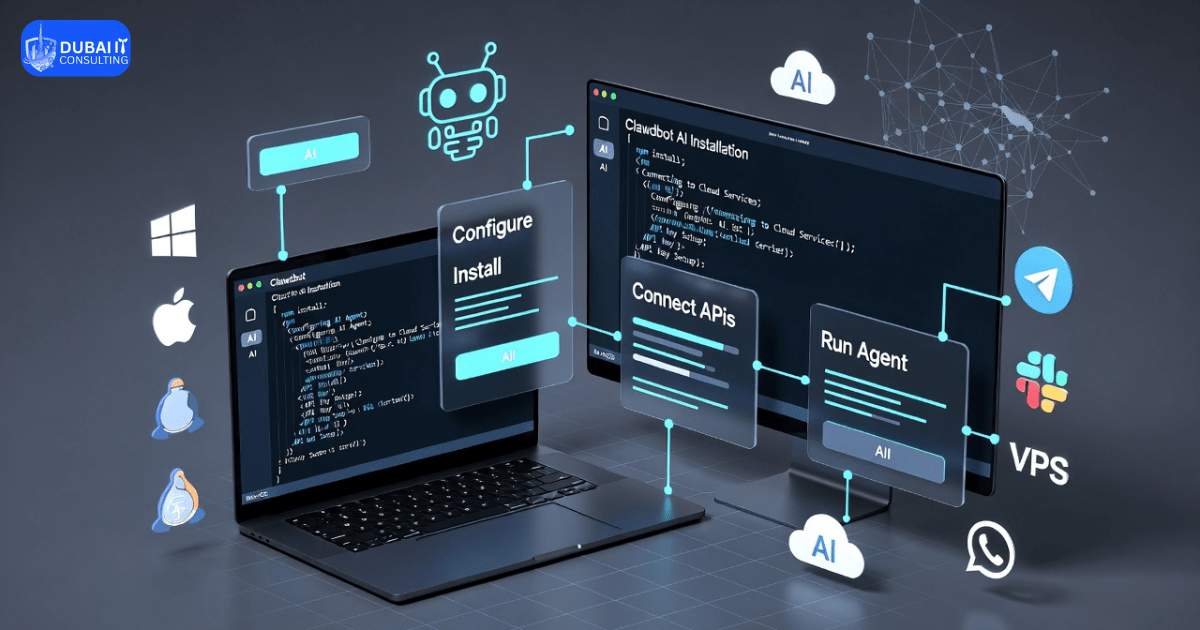
Clawdbot AI offers a straightforward installation process that can be completed in minutes on most systems. Below, we outline the system requirements and provide a detailed, step-by-step guide to get you up and running. This setup is ideal for individual users or small teams experimenting with autonomous AI agents. For larger enterprises in Dubai or the UAE pursuing enterprise AI solutions, professional customization is recommended to address security, scalability, and compliance needs.
System Requirements
Before beginning, ensure your setup meets these prerequisites for optimal performance:
- Operating System: macOS, Windows (using PowerShell or WSL2 for Linux compatibility), or Linux distributions like Ubuntu.
- Runtime Environment: Node.js version 22 or higher (the installation script will automatically install it if missing).
- Hardware: A modern computer with at least 8GB of RAM (more recommended for handling complex tasks or multiple agents). Compatible with laptops, desktops, Mac Mini, Raspberry Pi 4/5, or cloud VPS for 24/7 operation.
- Internet Connection: Required for downloading dependencies, API calls to large language models (LLMs), and initial setup.
- Additional Tools: Access to a terminal or command-line interface. For chat integrations, you’ll need accounts on supported platforms like Telegram, WhatsApp, Slack, Discord, Signal, or iMessage.
- API Keys: Keys from LLM providers such as Anthropic (Claude), OpenAI (GPT), or local models for self-hosting.
These requirements make Clawdbot AI accessible, but for business use involving AI automation services, verify compatibility with your IT infrastructure through AI consulting Dubai experts.
Step-by-Step Installation and Setup
Follow these high-level steps to install and configure Clawdbot AI. The process is automated where possible, but always review scripts for security before execution.
1. Prepare Your Environment Open a terminal window (Terminal on macOS/Linux, PowerShell on Windows). Ensure you have administrative privileges if needed. If using Windows without WSL2, install it first via Microsoft’s guidelines for better compatibility. This step sets the foundation for a smooth installation.
2. Run the Installation Script Execute the one-liner command to download and install Clawdbot AI: curl -fsSL https://openclaw.ai/install.sh | bash This script detects your OS, installs Node.js (if not present), downloads the Clawdbot package, and sets up the core components. It typically takes 2-5 minutes. For security, inspect the script’s contents online before running it, as it grants system access.
3. Complete the Onboarding Wizard After installation, the script launches an interactive onboarding process. Follow the prompts to:
- Select your preferred LLM provider (e.g., Anthropic Claude for advanced reasoning or OpenAI for cost-effectiveness).
- Input API keys securely (obtain these from the provider’s dashboard, such as console.anthropic.com).
- Configure basic settings, like enabling persistent memory for context retention across sessions. This wizard ensures the AI is tailored to your needs right from the start.
4. Set Up Chat Integrations Integrate Clawdbot AI with your preferred messaging app for seamless interaction:
- For Telegram (recommended for beginners): Create a new bot via BotFather in Telegram, obtain the bot token, and add it to Clawdbot’s configuration.
- For WhatsApp or Slack: Follow app-specific guides to generate access tokens and grant permissions.
- Test the integration by sending a simple command, like “Hello,” to verify connectivity. Clawdbot supports DMs and group chats, making it versatile for team collaborations in AI agents for business.
6. Define Permissions and Security Settings Configure access levels to balance functionality and safety:
- Enable full system access for tasks like file management or shell commands, but use sandboxed mode to restrict actions and prevent unintended changes.
- Set up browser control for web-related tasks, ensuring HTTPS for secure data handling.
- Review and limit permissions to essential features, especially if integrating with sensitive business data.
7. Test and Customize Start the Clawdbot daemon (background service) and send test tasks via your chat app, such as “Summarize my emails.” Monitor for errors and adjust configurations. Extend capabilities by adding community plugins or skills for specific workflows, like data analysis or automation.
Notes on Enterprise Deployment
While Clawdbot AI is excellent for personal or experimental use, enterprise deployment in the UAE requires additional considerations. Its open-source design allows on-premises hosting for data privacy, but scaling to multiple users or integrating with enterprise AI solutions demands customization. Issues like compliance with local regulations (e.g., PDPL), enhanced security against breaches, and governance for autonomous decision-making are critical. Partnering with an AI development company Dubai for custom AI development UAE ensures a production-ready setup, avoiding common pitfalls like over-dependence on default configurations.
By following this optimized guide, businesses can quickly prototype Clawdbot AI while planning for expert-led expansions through AI consulting Dubai.
Is Clawdbot AI Safe for Enterprise Use?
Data privacy is supported by local hosting, but risks from system access necessitate encryption and isolated environments.
Compliance with UAE regulations like PDPL demands audited setups, emphasizing responsible AI practices such as permission scoping.
Professional AI consulting in Dubai is crucial to mitigate vulnerabilities and align with enterprise standards.
Clawdbot AI vs Traditional AI Automation Tools
| Feature | Clawdbot AI | Traditional AI Automation Tools |
|---|---|---|
| Autonomy | High; proactive actions and persistent memory | Moderate; often reactive and session-based |
| Scalability | Flexible via self-hosting and multi-agents | Dependent on vendor infrastructure |
| Customization | Extensive through open-source plugins | Limited to predefined modules |
| Enterprise Readiness | Requires customization for security | Built-in compliance features |
This comparison shows Clawdbot AI’s strengths in flexibility, ideal for custom AI development UAE.
Role of AI Consulting Companies in Implementing Autonomous AI
Businesses need AI consulting to navigate complexities like integration and risk management. An AI development company in Dubai provides expertise in tailoring Clawdbot AI for local needs.
Benefits include enhanced security through audited deployments, compliance advantages, and scalability for growth. This ensures autonomous AI agents deliver value without pitfalls.
Conclusion
Clawdbot AI holds significant potential for automating business processes through autonomous agents. However, its success depends on expert-led implementation to address limitations. Businesses in Dubai and the UAE considering this tool should consult AI experts for tailored, secure solutions that drive real value.
FAQs About Clawdbot AI
What is Clawdbot AI used for?
Clawdbot AI automates tasks like email management and scheduling via chat apps, serving as an autonomous agent for personal and business efficiency.
Is Clawdbot AI suitable for enterprises?
It offers potential for automation but requires customization for security and scale, making it more experimental than ready for large deployments.
Is Clawdbot AI safe?
Local hosting aids privacy, but system access poses risks like breaches; safe use demands careful configuration and professional oversight.
Can Clawdbot AI be customized?
Yes, its open-source nature allows extensions via plugins and skills, adaptable for specific business needs with expert input.
Do businesses need AI consultants to deploy Clawdbot?
Absolutely; consultants ensure secure, compliant implementations, bridging technical gaps for effective enterprise use.