
Key Takeaways
- AI integration connects AI models to the ERP, CRM, and databases you already run — it doesn’t mean replacing them.
- A layered architecture (access, orchestration, integration, data, security) keeps AI reliable, auditable, and safe to scale.
- Starting with read-only access before controlled actions reduces risk while still improving efficiency early on.
- APIs, middleware, and RAG each solve a different problem — treating any one of them as the “whole strategy” is where most projects stall.
- UAE enterprises face additional compliance considerations (PDPL, sector-specific rules) that should shape the integration approach from day one.
- Enterprises that integrate AI properly see measurable gains in cycle time, cost per transaction, and customer experience — not just chatbot usage stats.
- Done right, AI integration builds a governed intelligence layer that helps teams stay competitive as the market — and the tooling — keeps changing.
Most enterprises don’t have an AI problem. They have an integration problem.
Walk into almost any mid-size or large organization in Dubai and you’ll find an ERP system running finance and procurement, a CRM holding customer relationships, a handful of SaaS tools, and at least one legacy application nobody wants to touch. Adding a chatbot on top of that doesn’t create enterprise value — it creates another disconnected tool competing for attention.
Real value shows up when AI can securely read business data, understand business context, and act within clearly defined limits. That’s a different problem than deploying a model. It’s an integration problem, and it touches data consistency, security, access control, legacy connectivity, compliance, and operational continuity all at once.
The central idea behind this guide is simple: successful AI integration connects AI to the systems that already run your business, without disrupting them. That requires APIs, middleware, retrieval-augmented generation (RAG), tool calling, agent orchestration, governance, and observability — working together, not as separate initiatives.
What Does AI Integration With Existing Enterprise Software Actually Mean?
AI Integration Is More Than Connecting a Model to a Database
AI integration is the practice of connecting AI models to the applications, data sources, and workflows a business already relies on — so the AI can retrieve trusted information, understand business context, trigger approved actions, and write results back into systems of record, all while staying auditable.
That’s a much narrower definition than “adding AI to your business,” and it’s intentional. A model that can answer questions about your company but can’t touch your ERP or CRM is a demo. A model that can retrieve accurate data, respect permissions, and complete an approved action inside your existing software is enterprise AI integration.
Five things need to happen for that to work:
- The AI connects to the applications your business already runs on.
- It retrieves data your teams already trust — not a stale export.
- It understands enough business context to apply the right rules.
- It triggers workflows that have been reviewed and approved.
- It writes results back in a way that’s logged, reversible, and auditable.
Which Enterprise Systems Can AI Integrate With?
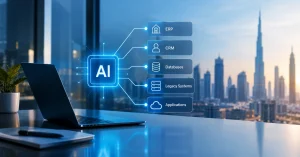
In practice, AI integration touches almost every category of enterprise software:
- ERP systems (SAP, Oracle, Microsoft Dynamics)
- CRM platforms (Salesforce, HubSpot, and industry-specific CRMs)
- SQL databases and data warehouses or lakehouses
- Document management systems
- Ticketing and service-desk platforms
- HR and payroll systems
- Custom, internally built applications
- Legacy on-premises software
- Industry-specific platforms (core banking, hospital information systems, port and logistics management tools)
The mix varies by sector, but the pattern doesn’t. AI needs a controlled path into each of these systems — never a direct, unrestricted connection.
Quick Question: “Does AI integration mean replacing our current software?”— No. It means giving AI controlled access to the systems you already use, so it can retrieve accurate data and complete approved tasks inside them — your ERP, CRM, and databases stay exactly where they are.
Why Connecting AI to Existing Systems Is Harder Than It Looks
Fragmented Data Creates Conflicting Business Context
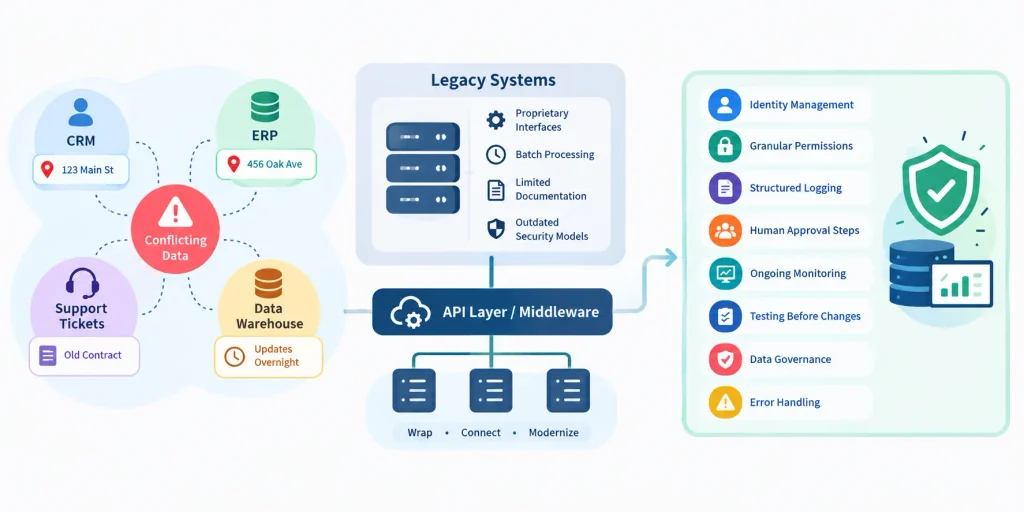
A CRM might list one customer address. The ERP has another. The support ticketing system still shows an older contract, and the data warehouse only catches up overnight. That’s not a hypothetical — it’s how most enterprise data actually looks after a decade of point solutions.
An AI system pulling from any one of these sources in isolation will confidently produce the wrong answer. It won’t know it’s wrong. That’s the uncomfortable part: AI doesn’t flag inconsistent context, it just uses whatever it’s given. Fixing this isn’t an AI problem at all — it’s a data governance problem that has to be solved before or alongside the integration work.
Legacy Systems Create Integration Bottlenecks
Older platforms weren’t built with AI, or often even modern APIs, in mind. Common blockers include proprietary interfaces, batch-based processing that only updates once a day, thin or missing documentation, and security models that predate today’s access-control standards.
None of this means legacy software has to be ripped out. Most organizations get further, faster, by wrapping legacy systems with an API layer or middleware adapter than by attempting a full replacement — which is exactly where dedicated legacy application modernization services Dubai teams typically start: building a controlled interface around the old system rather than rebuilding it from scratch.
Enterprise AI Requires Production Controls
A pilot running in a sandbox and a system running in production are not the same thing. Production-grade AI integration needs identity management, granular permissions, structured logging, human approval steps for sensitive actions, ongoing monitoring, testing before every change, formal data governance, and clear error-handling paths when something goes wrong. Skip any of these, and the project stays a demo no matter how good the model is.
The Recommended Architecture for Enterprise AI Integration
This is the part most guides skip, and it’s the part that determines whether an AI project survives contact with production. Think of enterprise AI integration as eight layers stacked on top of each other, each with a specific job. Mapping AI onto this structure — rather than bolting a model onto one application — is what actually unlocks enterprise AI capabilities at scale.
1. User and Experience Layer — Web apps, mobile apps, Microsoft Teams, employee portals, and contact centers. This is where people actually interact with the AI.
2. AI Application Layer — The assistants, copilots, document-intelligence tools, forecasting models, and agents that do the actual work.
3. Orchestration and Workflow Layer — The agent runtime, workflow engine, business rules, policy engine, human-approval steps, and transaction controls that keep AI actions inside defined limits.
4. AI Access and Tool Layer — APIs, function calling, tool registries, MCP servers, and other controlled enterprise tools. APIs expose business capabilities; AI-facing tool interfaces give models and agents controlled access to those capabilities without opening the whole system.
5. Enterprise Integration Layer — API gateway, middleware, iPaaS, ESB, webhooks, and event brokers. This is the plumbing that connects everything above to everything below.
6. Data and Knowledge Layer — Data warehouse, lakehouse, vector database, document repository, master data, and metadata.
7. Security and Governance Layer — Identity and access management, encryption, data-loss prevention, audit logs, data classification, AI evaluation, and monitoring.
8. Infrastructure Layer — Cloud, private cloud, on-premises infrastructure, UAE-region hosting where applicable, and GPU infrastructure for model workloads.
Skip a layer and something breaks later — usually security or auditability, which is the expensive kind of “later” to discover a problem.
5 Core Technologies That Make AI Integration Possible
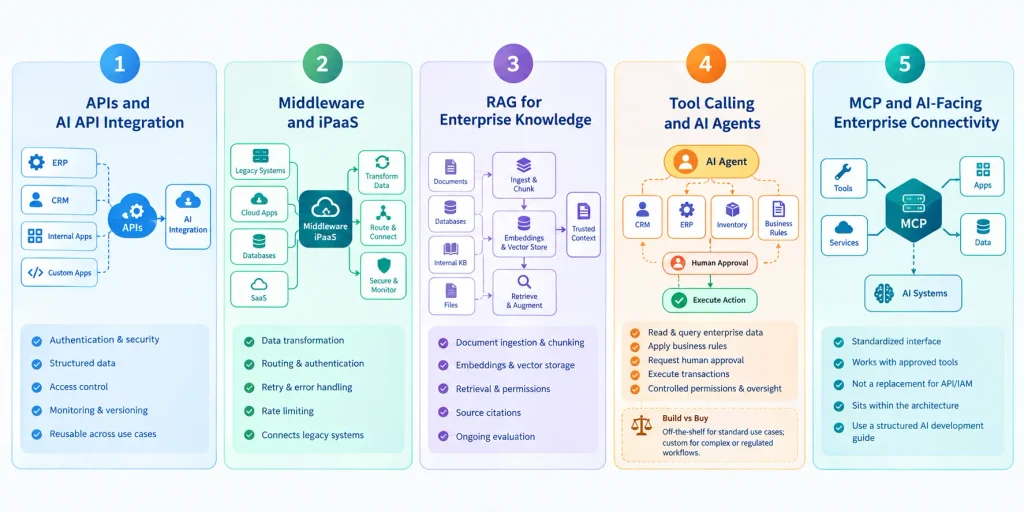
APIs and AI API Integration
APIs are generally the safer path into enterprise systems, and for good reason: they enforce authentication, return structured data, respect access control, can be monitored and versioned, and are reusable across multiple AI use cases instead of one-off scripts. AI API integration with ERP, CRM, internal services, and custom applications is, in most cases, the backbone the rest of the architecture sits on. Enterprises that don’t already have well-documented, stable APIs across their core systems often need dedicated API integration services Dubai providers before AI integration work can even start — because AI is only as reliable as the interfaces it’s calling.
Middleware and iPaaS
Middleware handles the unglamorous but essential work: data transformation, routing, authentication, retry logic, error handling, rate limiting, and connecting to legacy systems that don’t speak modern protocols. In enterprise AI integration, middleware is often what makes a 15-year-old application usable by a model at all.
RAG for Enterprise Knowledge
Retrieval-augmented generation pulls trusted documents and data into a model’s context at the moment it needs them — through document ingestion, chunking, embeddings, vector storage, retrieval, permission-aware access, source citations, and ongoing evaluation. RAG retrieves knowledge. It should not automatically be treated as a mechanism for executing business transactions — that’s a distinction worth repeating, because it’s the single most common architectural mistake in enterprise AI projects.
Tool Calling and AI Agents
Agents extend AI beyond answering questions. They can read CRM records, query ERP data, check inventory, apply business rules, request human approval, and execute an approved transaction — under controlled permissions and with oversight at every meaningful step.
This is also where the build-versus-buy decision usually surfaces. Weighing custom AI vs off-the-shelf AI tooling comes down to how specific your workflows are: standard use cases (ticket summarization, basic lead scoring) are often well served by off-the-shelf tools, while workflows tied to proprietary processes or regulated data tend to need custom-built agents with tighter control over logic and permissions.
MCP and AI-Facing Enterprise Connectivity
The Model Context Protocol offers a standardized interface between AI systems and approved tools or services — but it isn’t a replacement for API management, IAM, middleware, governance, or workflow orchestration. It sits inside that architecture, not above it. Teams evaluating where MCP fits often benefit from working through a structured AI software development guide rather than adopting the protocol in isolation.
How to Integrate AI With ERP Systems
Common ERP use cases include procurement assistants, inventory analysis, financial reporting, invoice processing, demand forecasting, supplier analysis, purchase-order preparation, and exception management — the kind of repetitive, rules-based work that benefits most from AI automation.
A typical flow looks like this: employee → AI assistant → policy check/RAG → ERP API → business rules → human approval → ERP transaction → audit log. AI should interact through controlled APIs or services, not by writing directly into core ERP tables. That single design choice is often what separates a safe ERP integration from a risky one.
How to Integrate AI With CRM and Customer Platforms
AI can draw on customer profiles, interaction history, sales opportunities, support records, contracts, and stated preferences to support real work: lead qualification, customer summarization, sales recommendations, proposal generation, service assistance, churn-risk analysis, and automated CRM updates.
The permission boundary matters here more than almost anywhere else. Reading CRM information to draft a summary is low risk. Letting AI modify a customer record is a different category of decision, and it should be treated that way — with explicit approval steps, not implicit trust.
How to Connect AI to Databases, Data Warehouses, and Legacy Applications
AI Integration With Enterprise Databases
Read-only replicas, SQL access through controlled services, data warehouses, and data lakehouses are the safer entry points for analytics-driven AI workloads. Unrestricted production database access — even with good intentions — introduces risk that’s hard to walk back once something goes wrong.
Quick Question: “Can AI work with our legacy on-premises systems?”— yes — through an API wrapper, middleware layer, or database replica sitting between the AI and the legacy application, rather than a direct connection into it.
Modernising Legacy Systems for AI
API wrappers, middleware, service layers, event-driven integration, database replicas, and controlled adapters all let older systems participate in AI workflows without a full rebuild. Enterprises don’t need to replace legacy software to introduce AI — they need a controlled way to expose what that software already does.
Security, Privacy, and UAE Compliance Considerations
What Data Does the AI System Actually Touch?
Map it explicitly: prompts, uploaded documents, CRM records, customer conversations, employee information, vector databases, AI outputs, logs, and any third-party AI providers in the chain. If you can’t answer “where does this data go” for each of these, the integration isn’t ready for production.
Key Security Controls for AI Integration
Identity and access management, role-based access control, encryption, secrets management, data-loss prevention, network segmentation, audit logging, data classification, API security, and clear separation between development, testing, and production environments.
UAE Data Privacy and Compliance
UAE enterprises need to assess their AI integration against the UAE Personal Data Protection Law (PDPL): lawful processing, data minimization, purpose limitation, retention limits, data-subject rights, vendor responsibilities, cross-border transfer rules, handling of sensitive data, and DPO involvement where applicable.
One clarification worth making directly: UAE law does not universally require all enterprise AI data to stay physically inside the UAE. Hosting location and cross-border processing requirements depend on the applicable law, the sector, contractual terms, data classification, and specific regulatory obligations — which is why this assessment needs to happen case by case, not as a blanket assumption.
Sector-Specific Requirements
Banking and financial services, healthcare, government, aviation, telecom, and logistics each carry additional regulatory layers on top of general data protection rules. Sector context should shape the integration plan from the start, not get bolted on afterward.
A Step-by-Step AI Integration Roadmap for Enterprises
Step 1: Create an Enterprise System and Data Inventory. Document every application, its owner, the data types it holds, its APIs, how it’s currently integrated with anything else, how critical it is, and its security classification.
Step 2: Choose One High-Value, Controlled Use Case. Look for clear business value, defined inputs and outputs, reliable underlying data, manageable risk, a measurable baseline, and room for human oversight.
Step 3: Establish the AI Integration Foundation. Build the API gateway, IAM, logging, secrets management, data governance, monitoring, environment separation, and approval controls before scaling anything. This is also the stage where most enterprises bring in outside expertise — the foundation work is where enterprise AI development services in Dubai teams typically add the most value, since gaps here (a missing gateway, weak IAM, no audit logging) are far more expensive to fix after go-live than before it.
Step 4: Start With Read-Only AI Integration. Let the AI retrieve information before it changes anything. Track accuracy, retrieval quality, data completeness, latency, and user adoption.
Step 5: Introduce Controlled Actions. Start small — draft a ticket, prepare a purchase order, update a low-risk classification, assign a service request, send an internal notification.
Step 6: Evaluate, Monitor, and Scale. Track process cycle time, cost per transaction, error reduction, manual hours saved, tool-call success rate, human override rate, compliance incidents, and business-process completion.
Common AI Integration Mistakes Enterprises Should Avoid
- Giving AI unrestricted system access. Least-privilege access and controlled tools beat broad permissions every time.
- Connecting AI directly to production databases. The risk of data corruption, security exposure, and uncontrolled transactions outweighs the convenience.
- Ignoring data quality. Poor enterprise data produces unreliable AI outputs, no matter how good the model is.
- Starting with complex autonomous agents. Prove the workflow with a narrow, supervised use case first.
- Treating RAG as a complete integration strategy. It provides knowledge retrieval, not transactional integration.
- Launching without AI observability. Prompt and response monitoring, model version tracking, retrieval evaluation, agent traces, drift detection, and cost monitoring all need to be in place before go-live, not added after an incident.
High-Value AI Integration Use Cases for Dubai and UAE Enterprises
Logistics and Supply Chain — shipment exception analysis, inventory intelligence, procurement support, route and event analysis.
Banking and Financial Services — document analysis, customer-service assistance, compliance knowledge retrieval, financial workflow support.
Healthcare — document processing, clinical and administrative knowledge retrieval, administrative workflow support.
Aviation and Hospitality — customer-service automation, operations intelligence, document workflows.
Retail and Enterprise Commerce — customer intelligence, inventory analysis, sales assistance, demand forecasting.
Every one of these ties back to a system the business already runs — ERP, CRM, a data warehouse, or an operational platform. None of them work as standalone AI projects disconnected from that context.
How to Measure AI Integration ROI and Production Readiness
Chatbot usage numbers make a weak business case on their own. Real production readiness shows up across three categories.
Business metrics — cycle-time reduction, cost savings, manual hours saved, error reduction, revenue impact, customer-service improvements.
Technical metrics — tool-call success rate, response latency, retrieval relevance, hallucination rate, system availability, cost per interaction.
Governance metrics — policy violations, unauthorized access attempts, human overrides, audit completeness, compliance incidents.
Production readiness means all three categories are measurable — not just the technical ones.
Conclusion
Enterprises don’t need to throw away their existing software to adopt AI. The goal is a governed intelligence layer sitting on top of what’s already there — APIs providing controlled access, middleware connecting fragmented applications, RAG supplying trusted knowledge, agents and tool calling enabling controlled actions, governance protecting data and operations, and observability keeping the whole system honest about how it’s actually performing.
For enterprises in Dubai planning this kind of work, an architecture assessment can identify system dependencies, API readiness, data risks, legacy constraints, governance gaps, and the right phased path to production — before writing a single line of integration code.
Frequently Asked Questions
What is AI integration with existing enterprise software?
It’s the practice of connecting AI models to applications and data a business already uses, so the AI can retrieve trusted information and complete approved actions securely.
How do you integrate AI with ERP and CRM systems?
Through controlled APIs, with business rules and human approval steps sitting between the AI and any transaction that changes a system of record.
What role does API integration play in enterprise AI?
APIs are usually the primary, safest path for AI to reach enterprise systems — they enforce authentication, structure, and access control that direct database access can’t.
Can AI integrate with legacy enterprise applications?
Yes, typically through an API wrapper, middleware, or a database replica, rather than a direct connection into the legacy system itself.
Is RAG enough for enterprise AI integration?
No. RAG handles knowledge retrieval well but isn’t designed to execute transactions — that requires tool calling and orchestration with proper controls.
Is MCP necessary for AI integration?
Not strictly necessary, but it can offer a standardized way for AI to reach approved tools — it works alongside API management and governance, not instead of them.
How can enterprises secure AI integration?
Through IAM, role-based access control, encryption, audit logging, data classification, and clear separation between development and production environments.
How long does enterprise AI integration take?
It varies by scope, but a single controlled use case, from inventory through a working read-only integration, commonly takes several weeks to a few months.
How much does enterprise AI integration cost?
Costs depend heavily on existing API maturity, data quality, and how much legacy modernization is needed before AI can connect safely.
How can businesses measure AI integration ROI?
By tracking business metrics (cycle time, cost savings), technical metrics (tool-call success, latency), and governance metrics (overrides, compliance incidents) together — not in isolation.